
In the ever-evolving landscape of digital content, AI has become an indispensable partner for creators, marketers, and businesses. The days of AI being just a simple video editing tool are long gone. Today, the best AI video creators are sophisticated tools capable of generating ideas, crafting entire video sequences, and even automating complex content workflows. But with so many options on the market, how do you choose the right tool for your needs?
As a content writer deeply involved with the world of AI, I’ve spent countless hours testing and evaluating these text-to-video conversion tools. In this guide, I’ll take you through a hands-on review of the top 10 AI-to-text video creators of 2026. I’ve tested each tool with the same prompt, giving you a real-world look at how they perform.
The Best AI Video Makers of 2026 at a Glance
For those who want a quick overview, here’s a summary of the top AI video makers and their strengths:
| Tools | Best for | Starting price (Monthly) |
Runway (Gen 4.5) | Enhanced creative control | $15/month |
| Personalized videos & translations | $29/month | |
OpenAI Sora | Storytelling based on a plot. | $20/month(via ChatGPT Plus) |
Kling AI | People are as authentic as can be. | $10/month |
Synthesia | Business & Training Videos | $29/month |
Luma Dream Machine | Fast, cinematic results | $9.99/month |
Pika | Creative content & social media | $10/month |
Google Veo 3 | Cinematic realism | $28.99/month(via Google AI Pro) |
Adobe Firefly | Adobe Creative Cloud users | $9.99/month |
Manus | Automating workflows with AI. | $40/month |
How We Tested the Best AI Video Makers
To provide the most accurate and objective review, we tested each of the 10 AI video makers with the same prompt. This allowed for a direct comparison of each tool’s ability to interpret and execute a complex creative brief.
Test Prompt:
“A young woman in a long emerald green coat walks alone through a rain-soaked Tokyo alley at night. Cherry blossom petals float in the air, clinging to the wet ground. Neon signs in Japanese kanji reflect pink and blue light on puddles. She stops at a small ramen stall, steam rising from the kitchen, and turns to look over her shoulder with a subtle, enigmatic smile. The camera slowly zooms in on her face. Cinematic lighting, shallow depth of field, anamorphic lens flare effect, a gloomy and emotional atmosphere.”
Evaluation Criteria:
• Accuracy & Consistency: How well does the tool follow the reminders? Are there any anomalies or inconsistencies?
• Authenticity & Quality: How authentic does the final video look? What is the overall visual fidelity?
• Creativity & Style: Does the tool add any creative touches or unique interpretations to the reminders?
• Ease of Use: Is the platform intuitive and easy to use?
1. Runway (Gen 4.5) – Best for Advanced Creative Control
Runway has established itself as a force in the AI video creation space, offering an advanced toolset that allows for detailed control over the creative process. It’s a favorite choice for filmmakers and VFX artists who need to do more than just create a clip from prompts.
Key Features
• • Advanced Camera Control: Provides precise control over camera movements such as pan, tilt, and zoom, allowing for more dynamic and intentional shots.
• • Multi-Motion Brush: A unique feature that lets you animate specific areas of images or videos, bringing static elements to life.
• • AI Training: You can train your own AI models in specific styles, ensuring brand consistency or a unique artistic look across your projects.
My Experience
Although the Free plan says it comes with 125 credits, there were none left when I signed up, so I switched straight to the Standard plan to properly test it out. First impressions? The interface is overwhelming. There’s a sidebar full of options like Tool, App, Chat, Workflow, and Live, which can be overwhelming if you’re just trying to create a video from plain text. It took me a while to find the actual prompt input bar, so it’s not the most intuitive experience for beginners.
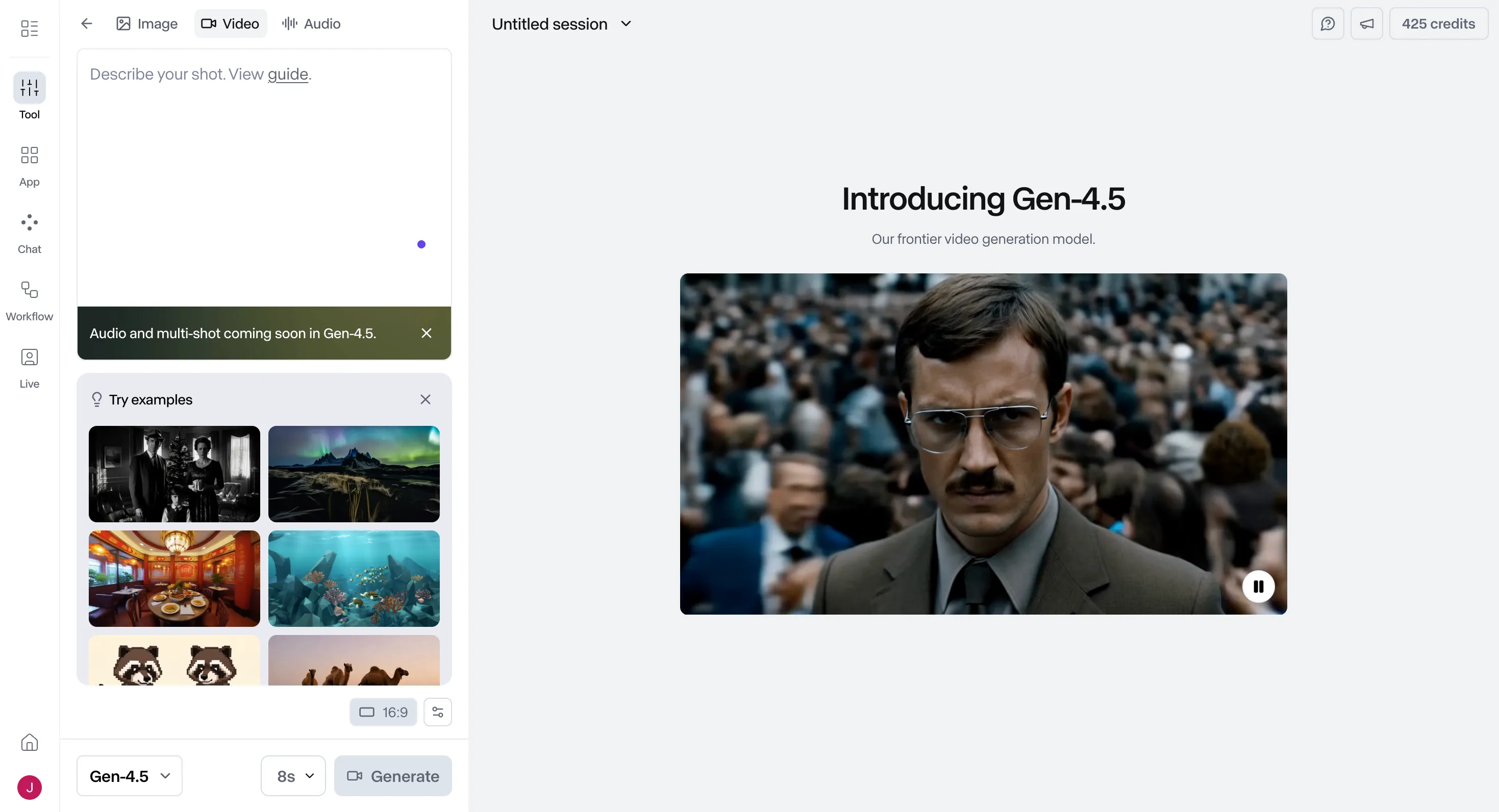
Once I got used to it and sent my reminders using the Gen-4.5 model, the creation time was quite reasonable, just a few minutes.
Video created:
The output captured most of the elements I requested, and the setting and the young girl looked really good. But here’s where it falls short: her eyes are faulty and move in a strange, robotic way, which is quite unsettling. The overall movement feels unnatural, as if she’s following overreactions. And the ramen counter? It doesn’t really look like a ramen counter at all, and the owner has some strange issues with his face and hands.
What I like and dislike
| What I like | What I don’t like |
| Multiple model options (Gen-4.5, Veo) | The interface is overloaded for beginners. |
| The creation time is acceptable. | Some facial and image errors |
| Includes most of the elements in the prompt. | The character’s movements are unnatural. |
Pricing
For those who want to try before buying, Runway offers a free plan with a one-time grant of 125 credits. (Although this didn’t work for me, you can try it.) It’s primarily for image and image-to-video creation. If you need more, the Standard plan costs $15 per month and includes 625 credits that refresh monthly, with several video creation templates available to choose from. Upgrading to the Pro plan for $35 per month will give you 2,250 credits and features like custom voiceovers for lip-syncing. Heavy users can consider the Unlimited plan for $95 per month, which offers unlimited creations at a relaxed pace.
2. HeyGen – Best for Personalized Video & Translation
HeyGen has carved out a niche for itself by focusing on creating personalized videos and translations on a large scale. It’s a great tool for sales teams, marketers, and businesses needing to create customized video messages for a global audience.
Key Features
• AI Video Translation: A standout feature that can translate your videos into multiple languages with impressive accuracy.
• Custom Avatar Creation: You can create your own AI avatar with voice-over functionality, allowing for highly personalized video messages.
• Interactive Avatars: HeyGen offers interactive avatars that can be used for personalized sales and marketing videos, creating a more engaging experience for viewers.
My Experience
I was surprised to see a free version, so I used it to test it out. From the outset, the interface is very clean and easy to use. It doesn’t overwhelm you with flashing videos or a million options; the prompt input box sits right in the middle of the page.
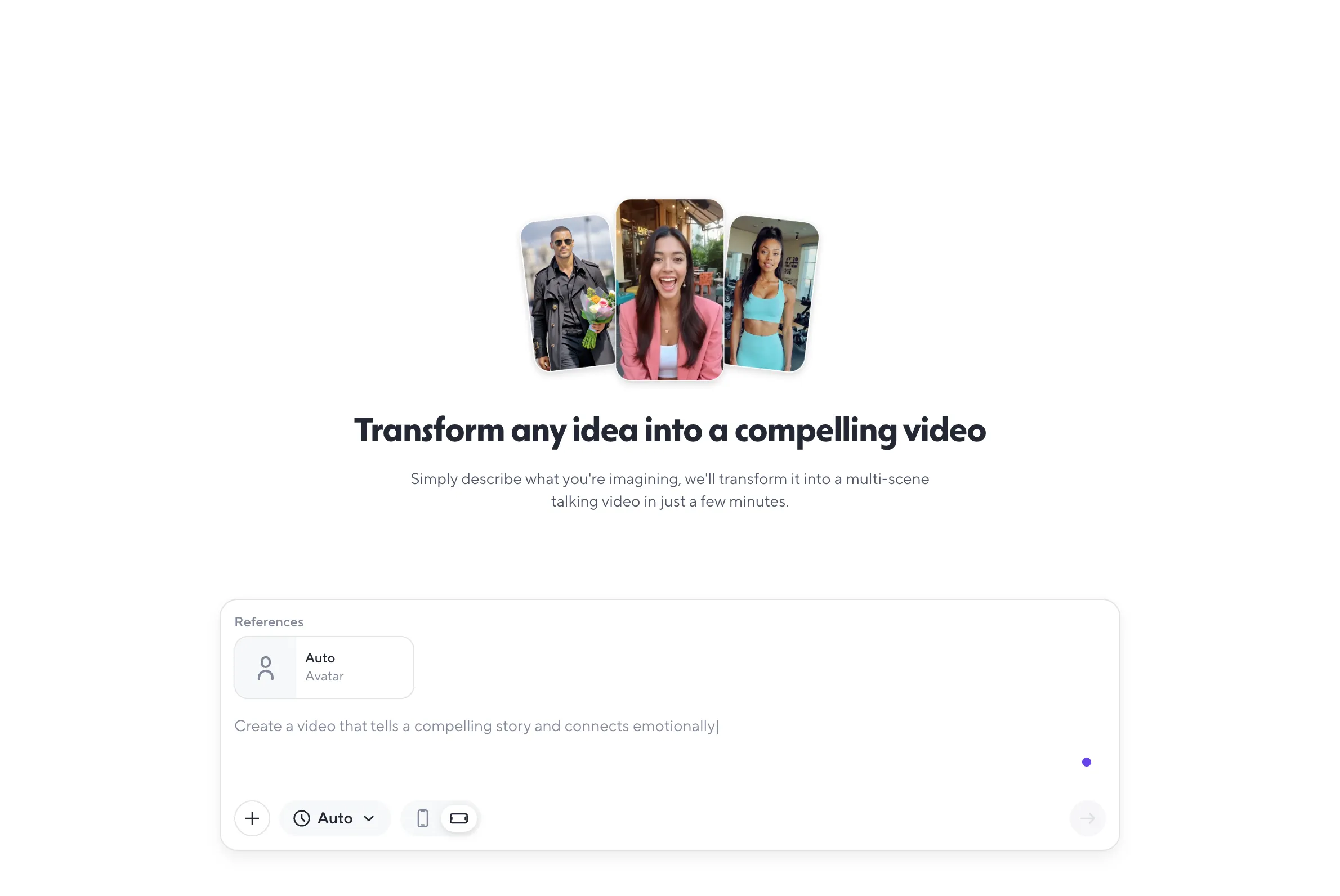
There’s also a neat avatar settings panel where you can choose from an avatar library or even create your own. One thing I noticed is that the video length options here vary, from 15 seconds to 3 minutes, longer than most competitors.
Before the video was created, HeyGen provided me with a summary of what it was about to create, which is a unique feature that allows you to edit at the last minute.
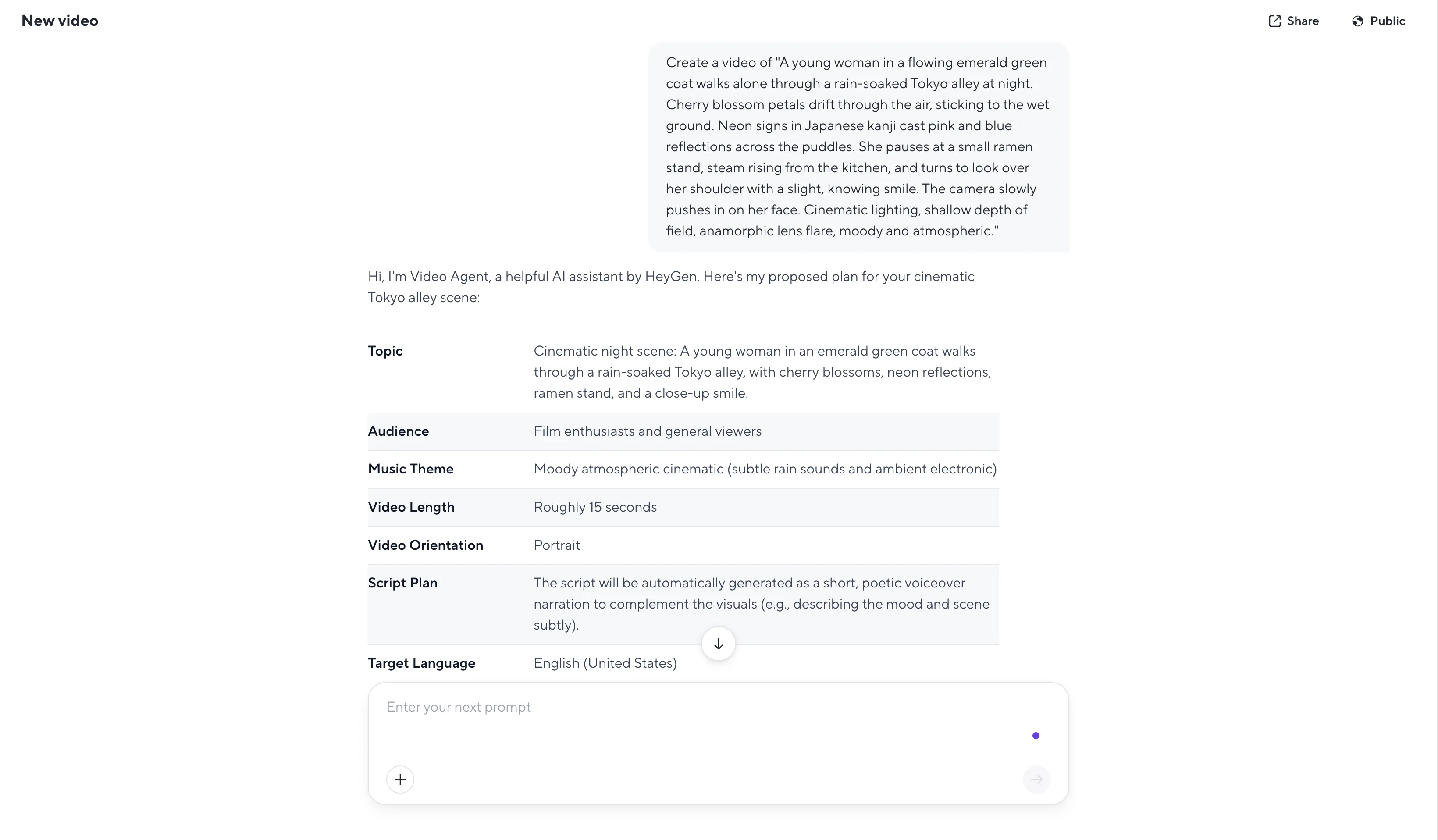
Video created:
The creation process takes longer than some other tools. Regarding the output, it includes a voiceover with subtitles narrating the scene, which is a bit odd. The avatars don’t look very realistic, resembling video game characters more than real people. The girl’s movements are unnatural, with noticeable frame changes, and her outfit and face are inconsistent throughout the video.
What I like and dislike
| What I like | What I don’t like |
| The interface is clean and easy to use. | Avatar resembles a video game character. |
| Pre-creation summary | Unnatural movement |
| Longer video length options | The issue of character consistency across frames. |
Pricing
HeyGen’s free plan lets you create up to 3 videos per month, which is a pretty good way to experiment. For unlimited videos, the Creator plan costs $29 per month. Teams looking to collaborate will want the Team plan at $39 per seat per month, which includes 2 seats and unlocks 4K video export.
3. OpenAI Sora – Best for Storytelling
OpenAI Sora It has generated a great deal of attention, and for good reason. It excels at creating longer, more coherent videos with a strong sense of storytelling. It’s a powerful tool for storytellers who want to create engaging video content from a simple text prompt.
Key Features:
• Create Long Videos: Sora can create videos up to one minute long, significantly longer than many competitors.
• Storytelling Consistency: It’s particularly good at maintaining consistency in timing and plot, creating videos that feel like a coherent story.
• Integration with ChatGPT: Sora integrates with ChatGPT, making it easy to use for anyone familiar with this popular chatbot.
My Experience
I used the free version, which is accessible through ChatGPT. The interface is quite user-friendly, with a simple toggle switch for creating videos and options for aspect ratio, resolution, and video length. The free version limits you to 480p resolution and 5-second videos, and it outputs two variations by default. Before I started, I checked the discovery page and was able to see some limitations of AI in other people’s creations, which lowered my expectations. But more than that, there’s a lot of color and motion, and while I understand that’s meant to showcase their creative range, it came across as quite overwhelming.
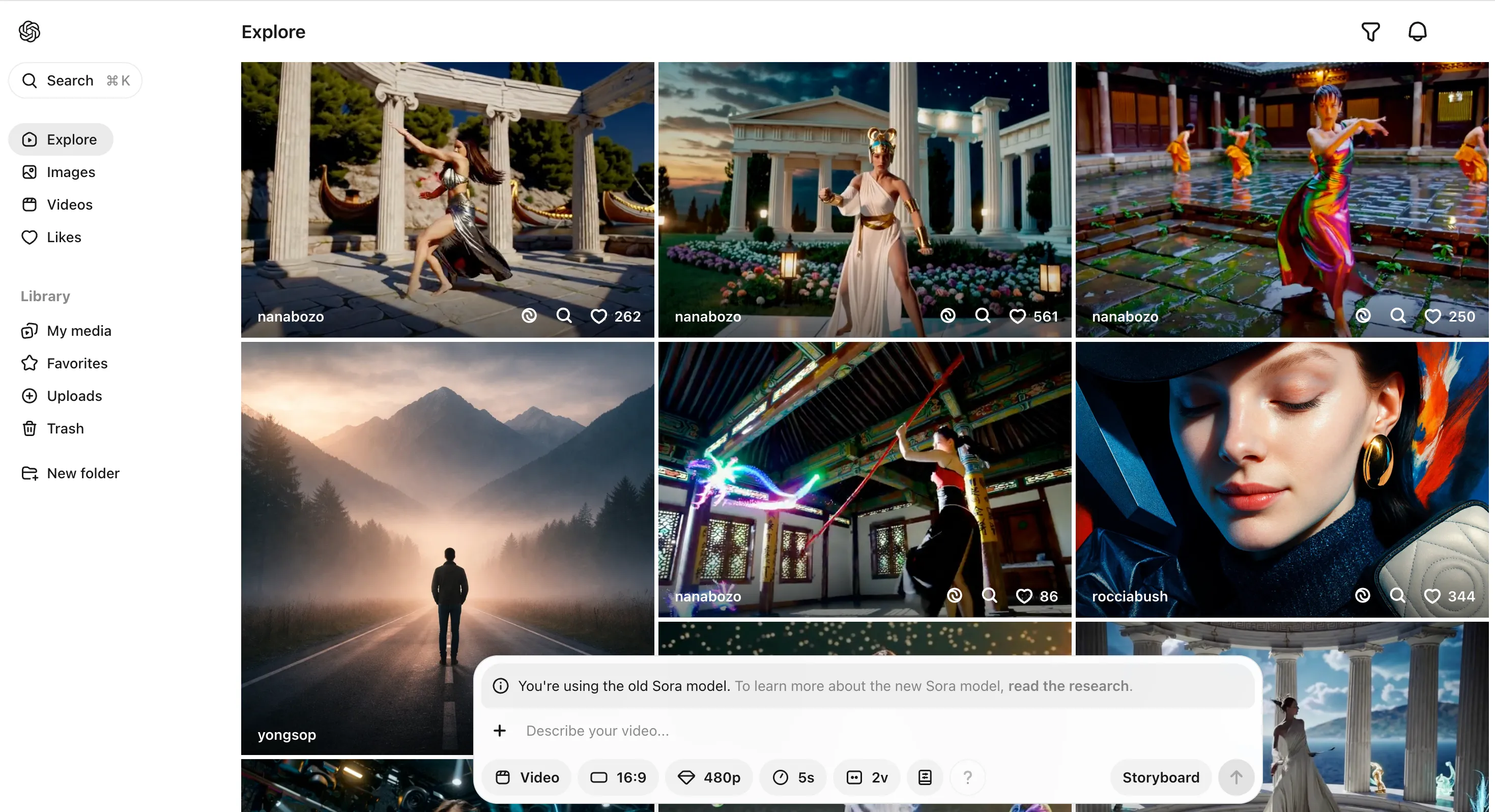
The first video was created:
The creation process was quick, under a minute even on the free setting. The first video was a bit of a failure. The young girl in the green coat appeared, along with the rain-soaked alley and cherry blossoms, but she turned back twice, which wasn’t on my prompt. Worse still, she seemed to be walking in place while only the camera moved, which looked unnatural.
The second video is much better and captures more elements, but the motion blur issue persists. It seems that creating realistic walking or running motion remains a common challenge for these tools. I also wanted to try Sora 2, but it’s not available in my area (Singapore), which is quite disappointing.
What I like and dislike
| What I like | What I don’t like |
| Fast creation time | The problem of walking movement |
| Multiple output variations | Regional restrictions apply to Sora 2. |
| User-friendly interface | Low resolution on the free version |
Pricing
Sora is not available as a standalone product. Instead, you access it through a ChatGPT subscription. The ChatGPT Plus plan, priced at $20 per month, offers limited access to Sora 1 video creation, up to 50 videos at 480p resolution or fewer videos at 720p. For expanded access, you’ll need the ChatGPT Pro plan, which costs $200 per month.
4. Kling AI – The Best for Realistic, Lifelike Humans
Kling AI has made a name for itself by specializing in creating realistic human characters and animations. It’s a great choice for creators who need to create videos with realistic human actors for social media, marketing, or other content.
Key Features
•
Realistic Human Creation: Kling AI is a leader in creating realistic human faces and animations.
• Powerful Mouth Synchronization: It offers impressive mouth synchronization capabilities, making it a great choice for videos with dialogue.
• Fast Creation Time: Kling AI is one of the faster video creators on the market, allowing for quick iterative and trial-and-error testing.
My Experience
The free version constantly had traffic errors, so I switched to the Standard plan.
The app interface has a lot of stuff, but navigating to the text-to-video creation feature is quite easy. There are options for video length (5s or 10s), aspect ratio, and the number of outputs. Some features, like the Professional mode, are locked behind VIP tiers, but the default settings work well. There’s also a DeepSeek option built into the prompt input box to help fine-tune your prompts, which can be helpful for new users unsure what to include in their text. They also have multiple model versions, and I chose Video 2.6, the latest version. The creation process is quick, taking a maximum of about a minute.
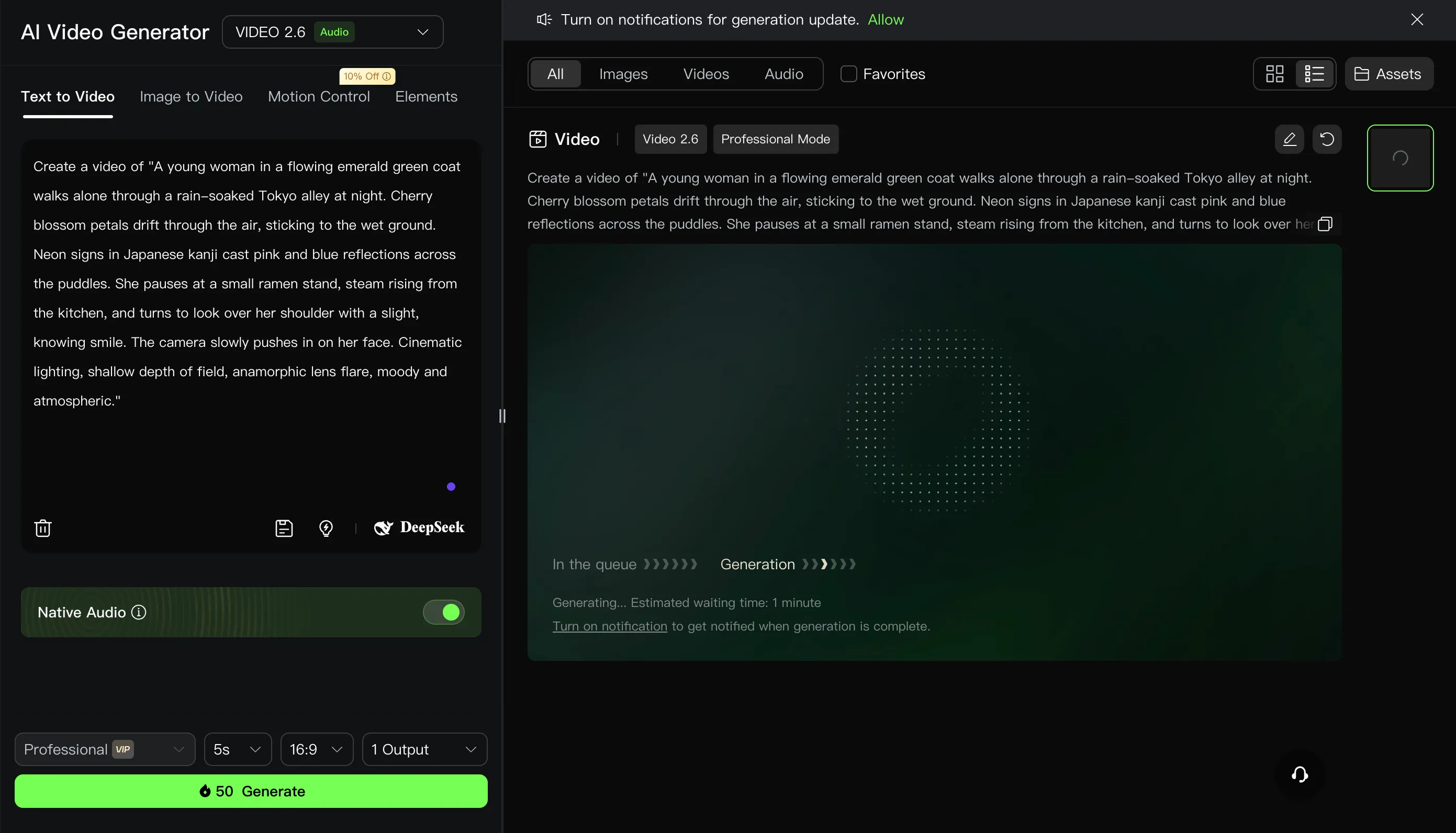 Video created:
Of all the tools I tested, this one produced the most natural-looking video. The walking, stopping, camera shots—everything felt more authentic. However, some elements were slightly off. The jacket looked more like a turquoise raincoat than the long emerald green coat I described. The cherry blossoms only appeared in one area and stopped falling when the camera zoomed in on her face. The ramen counter looked fine, but it was strange that no one was serving it despite the steam. There were no anamorphic lens flare effects or reflections in the puddles, and the AI made the rain very heavy, which was its own creative choice. However, in terms of realism in human movement, Kling AI is hard to beat.
What I like and dislike