
 In the last 13+ years, I’ve used nearly every email marketing tool. First for 8 years at an email marketing agency, in my projects with customers. Then I guided over 2,000 senders and brands to find the right software on this site.
As an experienced email marketer, you learn what matters and what doesn’t. You can say we know a lot about email marketing software. Our team has reviewed over 30+ email marketing platforms on this site ourselves.
So we want to share our insights to save you time. And more specifically, help you choose the right email marketing platform.
What makes great email marketing software stand out from just ok? What are the must-have features? What should it cost? If you need help, just get in touch, we’re happy to help.
Now, let’s get you set up with the best platform for your needs.
The Best Email Marketing Services
If you are looking for more specific tool recommendations, check out the reviews in specific industries:
- Best CRM with email marketing
- Free and cheap email marketing tools
- Best email marketing tools for ecommerce
- Best email marketing tools for Shopify stores
- Best email marketing tools for affiliate marketers
- Best CRM with marketing automation
- Jump to our industry overview below
15 Best Email Marketing Platforms Overview
I’ve seen email marketing software used in lots of different ways. But most people are looking for an email marketing platform to do the important things in a simple way.
Create attractive HTML emails without code. Automate your campaigns. Segmentation and targeting messages at the right people. All good email marketing services aim to tick these boxes.
But there are also plenty of differences between platforms. The features they include, who they are best for, and what they cost. I’ll explore these differences in detail in individual reviews for each platform. But below is a summary of the 15 services we chose out of the 35 we reviewed.
| Best For | Free Plan/Trial | Starting Price | Score | |
| MailerLite | Starting with email marketing | Yes | $9 |  |
| Brevo | Free email marketing | Yes | $8.08 |  |
| ActiveCampaign | Marketing automation | Yes, 14 days | $15 | |
| beehiiv | Newsletters & monetization | Yes | $43 | |
| Moosend | Small businesses | Yes, 30 days | $7 | |
| HubSpot | All-in-one platform | Yes | $20 | |
| Mailjet | Newsletters & email API | Yes | $15.30 |  |
| Omnisend | Ecommerce | Yes | $16 | |
| AWeber | Email design | Yes | $12.50 | |
| Kit | Subscriber growth & creators | Yes | $39 |  |
| MailChimp | Yes | $13 | | |
| Campaigner | Yes, 30 days | $59 | | |
| GetResponse | Yes | $15 | | |
| Constant Contact | Yes, 14 days | $12 |  | |
| Benchmark Email | Yes | $13 | |
What to Look for in an Email Marketing Platform?
I’ve used my fair share of email marketing platforms over a long time. We have tested and reviewed 30+ for this website. That’s given me a lot of experience with both the good and bad of email marketing. But there are always some features I look out for as essentials. Here are my top six:
- Drag-and-drop email editor: You won’t find an email marketing service without a no-code HTML email builder these days. They’re essential for making attractive email designs quickly. So the first thing I judge email marketing software on is how user-friendly the email builder is. Plus, the quality and choice of pre-made templates.
- User-friendly automation: Automation speeds up and simplifies everything to do with triggered email marketing. That can be simple autoresponders and welcome campaigns. Or automating entire customer journeys, including how you nurture and segment leads. Whatever you want to automate, it should be doable. As with creating emails, I always look for visual workflow builders, how intuitive they are to use, and how detailed you can make the automation.
- Landing Pages and Forms: Email marketing doesn’t go anywhere without people to send campaigns to. Growing your email list is key to growing your business. You can use other list-building tools, but most good email marketing software includes lead capture and sign-up forms. And landing pages to host forms on.
- Personalization and Segmentation: Email marketing gets the best results when you target your campaigns and make them personal. Segmentation tools split your contacts up according to contact information and their behaviour. This helps you send timely, relevant content to the right people. And improve engagement and conversions.
- Flexible Pricing: Cost is always a consideration when choosing any platform. The key is getting the features you need at a price you can afford. For me, the best email marketing services start their pricing low and have the flexibility to grow. We look at how many subscribers you get and the email limits. A generous free plan or a full-feature trial is helpful. So you can check a service out without being tied to it.
- Strong Deliverability Rates: Finally, an email marketing campaign only works if your emails get seen. You want as many emails landing in people’s inboxes as possible. High deliverability rates depend on the email service having a good sending infrastructure. But also on you keeping your list clean and reducing bounces. And keep your sender reputation high.
15 Best Email Marketing Platforms in 2026
Now for the best bit. A detailed run-through of the key features, USPs, pros, cons, and prices of all 15 platforms. Based on my experiences using them.
1. MailerLite: Best for starting with email marketing
MailerLite is an affordable and user-friendly email marketing platform. It keeps things simple to use and focuses on the email marketing functionality. This makes it ideal for a no-fuss way to build and automate email campaigns. Which is also great for beginners. The free plan is one of the most generous around.
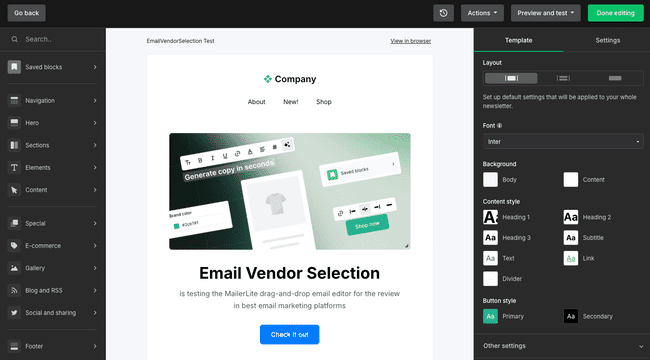
I’m a big fan of MailerLite’s clean, intuitive interface. Everything is easy to navigate. MailerLite’s drag-and-drop email editor makes creating professional-looking marketing campaigns as simple as it can be. It comes with 90+ pre-designed email templates to start.
MailerLite also includes forms, a landing page builder, and a simple website creator.
These are all similarly easy to use.
For its price, MailerLite’s automation tools stand out to me as another major strength. Welcome emails, abandoned cart emails, audience segmentation, and more. You can build some relatively advanced workflows with multiple triggers and actions. The automation editor is simple to use, even for beginners. This is for small to midsize companies, not to build complex enterprise automations.
MailerLite Pros
- User-friendly drag-and-drop email editor
- Very attractive pricing with a generous free plan
- Solid automation features for small businesses
- Landing page, form, and website builder included
- Strong deliverability team compared to competitors
MailerLite Cons
- The interface is only available in 3 languages
- ActiveCampaign and others have more advanced automation
The free plan includes 1,000 subscribers and 12,000 emails per month. MailerLite’s paid plans for email marketing start at just $9 per month. That includes unlimited emails and three account users.
Try MailerLite for free or read our full review
2. Brevo: Best for free email marketing
Brevo is an email marketing and CRM platform for small businesses, ecommerce brands, and marketers. Alongside email marketing, it has SMS marketing, CRM, and transactional emails. It suits businesses wanting to manage multiple communication channels in one place. It’s also user-friendly and affordable. Including a fantastic free plan
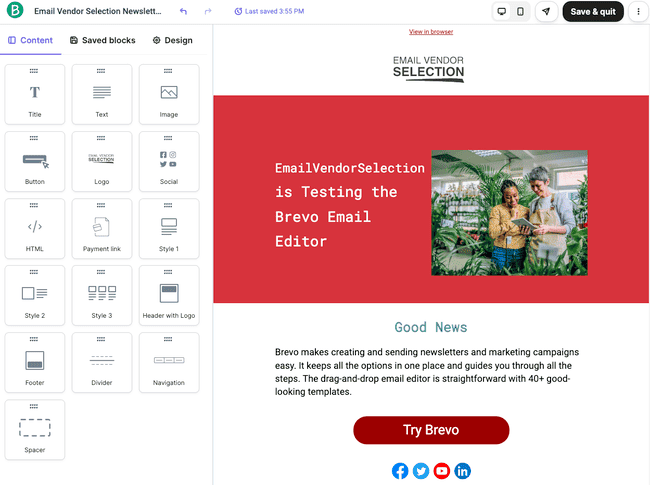
I’ve always found creating a marketing campaign in Brevo very straightforward. Its drag-and-drop email editor is well-designed and simple to use. But with just 40+ templates to start with, you don’t get much design support. Its marketing automation tools are very impressive. It supports website tracking so you can trigger automated sequences from website visits. And it has 12 pre-built workflow templates. These cover lead nurturing, abandoned carts, personalized follow-ups, and more.
Brevo lets you send multi-channel campaigns including SMS and WhatsApp messages. Businesses can send transactional emails like receipts and order confirmations alongside promotional emails. It also has a sales CRM, so you can track customer interactions across marketing and sales.
What stands out about Brevo is how much you can do for free. The free marketing platform plan includes 100,000 contacts and lets you send 300 emails a day. These can be marketing or transactional emails. You can also include SMS and WhatsApp messages. You can use basic CRM tools for free, too.
Brevo Pros
- Excellent free plan
- Low-cost pricing supports business growth
- User-friendly drag-and-drop email editor
- Strong automation and transactional email capabilities
- SMS marketing, CRM, and live chat tools
Brevo Cons
- Limited email template selection compared to competitors
Paid plans start at just $8.08 per month for 5000 emails. A unique feature of Brevo’s pricing is its very high contact limits. You can have 500,000 contacts even on the cheapest plan. This gives your business plenty of headspace to grow your contact lists for no extra costs.
Get started with Brevo for free or read our full review
3. ActiveCampaign: Best for marketing automation

ActiveCampaign ranks as one of the best marketing automation platforms around. It’s equally well-known for its advanced features and its user-friendly design. It caters to businesses of all sizes. And offers everything from basic email marketing campaigns to sophisticated automation. It also has an impressive CRM.
I find ActiveCampaign amazing for building HTML emails, landing pages, and forms. The drag-and-drop editors are very similar for all three. They are easy to use, and you get a lot of control over designs. There are also an impressive 240+ email templates to choose from. And 60+ landing page templates.
ActiveCampaign comes into its own with more advanced tools. Especially automation. With 900+ workflow templates, it’s hard to think of a sales or marketing process you can’t automate. Triggers and conditions are fully customizable. So you get complete control over what workflows include and how they function. You can link sales and marketing processes together. And use AI-powered predictive analytics to narrow down the best leads and target emails.
ActiveCampaign Pros
- Advanced automations with over 900 workflow templates
- Integrated CRM to align sales and marketing
- AI predictive analytics for advanced targeting
- User-friendly email editor with 240+ templates
- High deliverability rates
ActiveCampaign Cons
- The learning curve for beginners can be a bit steep
ActiveCampaign’s Starter plan costs $15 per month for 1000 contacts and 10,000 emails. There’s a 14-day free trial that lets you send 100 emails to 100 contacts.
Try ActiveCampaign for free or read our full review
Or compare it to other software in our guide to the best ActiveCampaign alternatives.
4. beehiiv: Best for newsletters and monetization

Beehiiv specializes in helping creators and businesses monetize newsletters. In terms of features, there are two sides to the platform. One has everything to do with creating and publishing newsletters. The other is about audience growth and making money.
Beehiiv has a clean, intuitive editor for creating newsletters. It’s a little different from the standard drag-and-drop HTML editors most email marketing platforms have. It leans heavily into text editing tools. Including generative AI features for checking, editing, and making suggestions. These are all great for perfecting your newsletter copy. And making production more efficient.
The monetization features start with list building. With Beehiiv, more subscribers translate into more earning potential. Its choice of lead generation tools stands out from other email marketing platforms. You can build different types of sign-up forms as standard. But it also has the option of one-click Magic Link subscriptions. There’s a referral program that incentivizes subscribers to get their friends to sign up. And you can cross-promote other newsletters to encourage them to do the same with yours.
Recommendations are also one way to monetize your newsletter. You can include paid-for affiliate links to other publications. And get paid for every referral. Beehiiv also runs an ad network. Again, this involves running ads in your newsletter and getting paid per click. And finally, you can also make your newsletter a paid-for subscription. Beehiiv has tools for handling payments.
Beehiiv Pros
- No-code website and newsletter builder
- AI writing tools
- Advanced audience growth tools, including a referral program
- Multiple monetization options
- Advanced analytics and growth dashboards
Beehiiv Cons
- More expensive than many email marketing services
Beehiiv pricing starts at $43 a month. You can send unlimited emails and have 100,000 subscribers. There’s a free plan with no monetization features and a cap of 2,500 subscribers.
Try beehiiv for free or read our full review
5. Moosend: Best for small businesses
Moosend is one of the cheapest email marketing platforms around. But it’s more than just a budget, no-frills service. For its price, Moosend’s features pack a serious punch. Especially its automation and personalization tools.
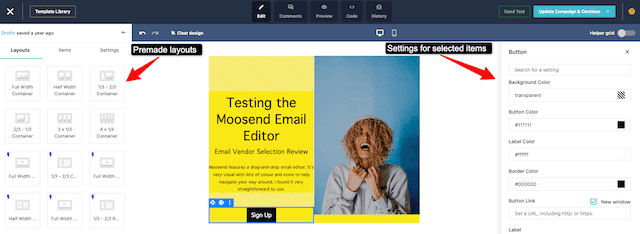
A lot of Moosend’s strengths come down to UX design. All core tools are visually attractive, well laid out, and intuitive. I find it a pleasure to use. It has the same drag-and-drop editor for building campaigns, landing pages, and forms. As a new user, you feel familiar with the tools quickly.
Moosend’s automation builder is similarly easy and intuitive to use. But that’s balanced against some serious flexibility and advanced features. Moosend reaches way beyond basic drip sequences. You can build sophisticated workflows with many conditions and actions. There are 25+ triggers to choose from. These include web tracking. So you can launch automations based on what people do on your website. You can also use web tracking to update customer data and build segments. And use this to personalize email content.
One final thing I like about Moosend is that it includes all Pro features on a single paid plan. You pay more to raise contact and email limits, not access more tools. This doesn’t just make Moosend’s pricing very straightforward. It also makes more sophisticated tools available at prices suited to any business.
Moosend Pros
- Single main pricing tier with access to all features
- Low cost with no email limits
- Advanced automations with 25+ triggers
- Web tracking and behaviour-based personalization
- Consistent user-friendly UX
Moosend Cons
- It would be nice to see a free plan.
Moosend’s Pro pricing plan starts at $7 a month for 500 contacts and unlimited emails. There is a 30-day free trial.
Try Moosend for free or read our full review
6. HubSpot: Best all-in-one platform
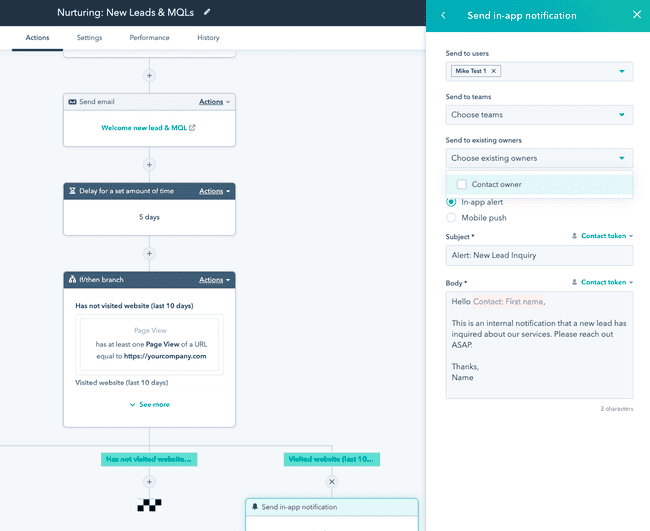
HubSpot is a giant CRM software suite for sales, marketing, and customer service. Email marketing tools are included in its ‘Marketing Hub’, a powerful marketing automation platform. These tools cover everything you need for email marketing. User-friendly drag-and-drop editors for building emails, landing pages, and forms. Sophisticated automation tools, personalization, and detailed analytics. You can also run SMS and social campaigns alongside email.
Where HubSpot stands out is its flexible integration of marketing, sales, and service. Yes, it’s a solid email marketing and marketing automation tool. HubSpot’s USP is the freedom to run email marketing alongside sales automation. Or customer service operations. Or content management or eCommerce. It covers every aspect of customer relationship management.
HubSpot also offers something for businesses of all sizes. Its Customer Platform is aimed at small businesses. It combines email marketing, automation, CRM, and service tools. Larger businesses can pick and choose tools to create their own custom platforms. There is also an excellent free tier with basic versions of all tools. You can run email campaigns and manage sales pipelines. All for no cost.
HubSpot Pros
- All-in-one CRM with integrated marketing, sales, and service hubs
- Powerful marketing automation for email and multi-channel campaigns
- Flexible options to suit businesses of all sizes
- Generous free CRM
- 1500+ third-party integrations
HubSpot Cons
- Prices rise steeply beyond small business plans
HubSpot plans start at $20 per month. The cheapest plans with email marketing include 1000 contacts and 5000 emails. The free CRM includes 100 contacts, 2,000 emails, 20 landing pages, 1 pipeline, a website, a blog, social media ads, and live chat.
Try Hubspot for free or read our full review
7. Mailjet: Best for newsletters and email API
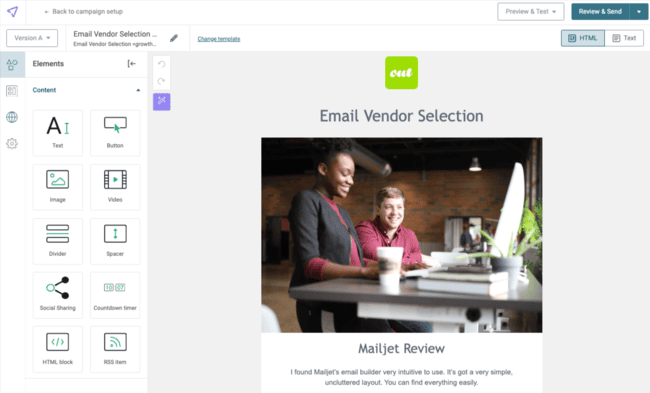
Mailjet is an email marketing platform that also has transactional email sending. Marketers at mid-sized businesses and larger enterprises use Mailjet for newsletters, marketing automation, and transactional emails.
Mailjet uses volume-based pricing instead of charging by contacts. All paid plans include unlimited contacts. This makes it more affordable for businesses with large lists and moderate sending volumes.
The platform includes a drag-and-drop editor, email templates, segmentation, A/B testing, and automation. Last year, the Mailjet team improved the automation builder to include conditions. Now you can create more advanced workflows, not just email sequences.
Mailjet also includes built-in email validation, deliverability tools, and reporting. These features help reduce bounces and protect your sender reputation.
Mailjet has an SMTP and email API for transactional emails. It also offers real-time collaboration so multiple users can edit emails at the same time.
Pros
- Unlimited contacts on all paid plans
- Built-in email validation and deliverability reporting
- Supports both marketing and transactional emails
- Real-time collaboration in the email editor
Cons
- We’d love to see more automation workflow templates
- Some features, like transactional emails and forms, feel hidden away
Mailjet plans start at $15.30 per month for the Essential plan with unlimited contacts, 15K emails, 500 email validations, and AI writing. The free plan has 1,000 contacts and 6,000 emails per month.
Get started with Mailjet for free or read our full review
8. Omnisend: Best for ecommerce
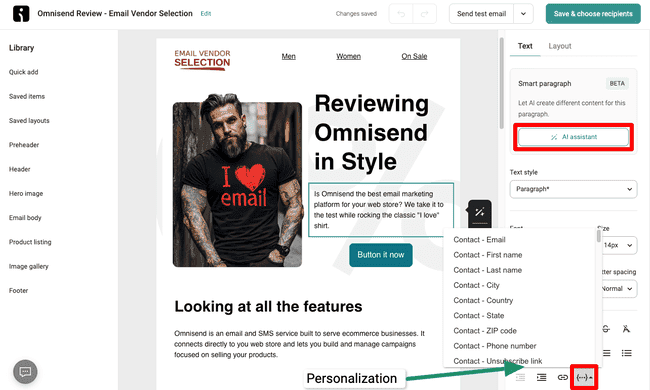
Omnisend specializes in email marketing for ecommerce businesses. It’s designed to support online sales growth and works with all major ecommerce platforms.
Omnisend excels at campaign building and automation. Its 350+ email templates lean towards product promotion. But they’re all good, professional quality. The drag-and-drop editor is easy to use. But it gives plenty of flexibility in customizing layouts and styles. The same goes for its automation tools. The setup of its pre-built workflows is one of the easiest I’ve come across. You can launch abandoned cart emails and welcome series in just a couple of clicks. But you can also create your own sequences with conditions and actions.
Automation is one tool Omnisend uses to enhance engagement and conversions. The other is advanced segmentation. Omnisend uses customer data from web store integrations for precise targeting and personalization. For me, its Customer Lifecycle Map feature is a real standout. This evaluates customer engagement levels based on past behaviour and interactions. And recommends actions to take to nurture them to the next stage.
Omnisend Pros
- Conversion-focused ecommerce marketing tools
- Integrations with all major ecommerce platforms
- Targeting and segmentation based on store and campaign data
- 24/7 live chat and email support
- Competitive pricing with a packed free plan
Omnisend Cons
- As an ecommerce specialist, having no product page builder feels like a miss
Omnisend plans begin at $16 per month for 500 contacts and 6000 emails. There’s a free plan that includes 250 contacts, 500 emails, and 500 push notifications.
Get started with Omnisend for free or read our full review
9. AWeber: Best for email design
Established in 1998, AWeber is one of the very first email marketing platforms. It clearly does a lot of things right to have kept going so long. And to have racked up more than 1 million customers.
AWeber sticks to the old school of email marketing. That is, making it as easy and quick as possible to send beautiful emails. It’s got an intuitive and simple drag-and-drop editor. This is backed up by an outstanding choice of 600+ email templates.
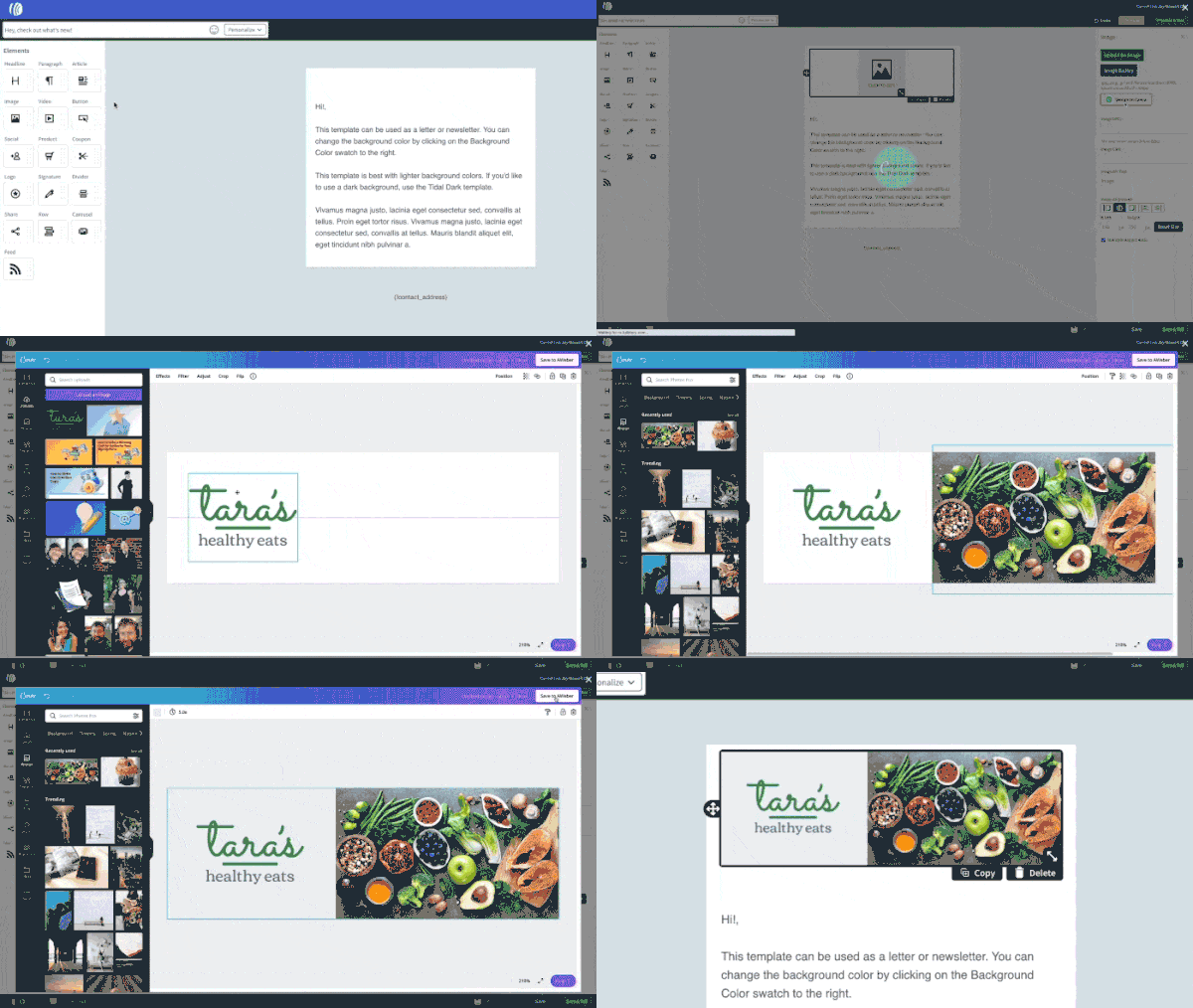
AWeber also goes the extra mile to support great design. A standout feature is the Smart Designer. This automatically generates branded templates based on your website’s URL. AWeber also has a Canva integration built into its email editor. So you can craft your own graphics directly from the email editor. And Canva is just one of 750+ integrations AWeber offers.
AWeber’s automation features are basic. You can set up simple autoresponders and drip campaigns. But it lacks a visual workflow editor and conditional logic.
AWeber Pros
- User-friendly drag-and-drop email and landing page editor
- Huge library of 600+ customizable free templates
- Smart Designer for automatic branded template creation
- Canva integration for in-editor graphic design
- 750+ third-party integrations
AWeber Cons
- Automation features are a little basic
AWeber’s paid plans start at $12.50 per month for unlimited emails and 500 contacts. It has a free plan that also includes 500 subscribers and 3,000 emails per month.
Try AWeber for free or read our full review
10. Kit: Best for subscriber growth and creators
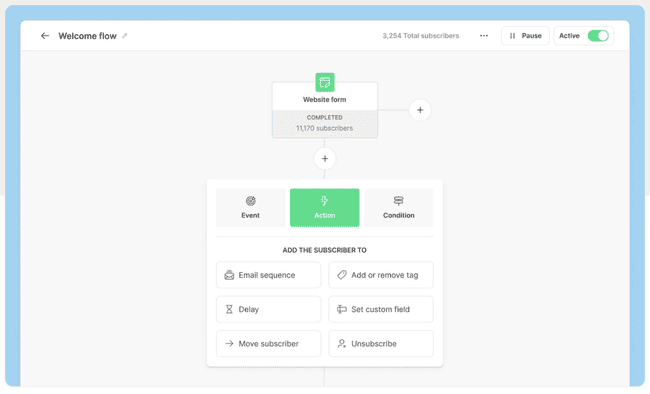
Kit (formerly ConvertKit) is another platform that focuses on newsletter monetization. It’s aimed at online creators like bloggers, podcasters, and influencers. And offers tools to help grow audiences and revenues via email campaigns.
Kit’s monetization options fall into two camps. Making money from newsletters via paid subscriptions and recommendations. And promoting and selling digital products, including courses. Both start with building attractive newsletters and landing pages. So Kit features the standard drag-and-drop HTML builders for both. Its templates are bright, modern, and fully customizable. They’re geared towards repurposing existing content quickly and effectively.
Kit ties audience growth and earning potential closely together. There’s the usual option of sign-up forms to gather new subscribers. But a standout feature is Kit’s Creator Network. This allows users to cross-promote through partnerships with other creators. You can also pay for and earn money via partner recommendations. Mirroring this is the Sponsor Network. This helps creators find affiliate and brand partnerships.
Finally, Kit has a great visual workflow builder. It supports conditional logic. And you can automate customer interactions from the moment they sign up. I particularly love the segmentation options. You can tag contacts to reflect different subscriptions or levels of engagement. But you can also do things like run polls and surveys. And use the results to trigger targeted campaigns.
Kit Pros
- User-friendly email and landing page editor
- Advanced automation and segmentation tools
- Multiple monetization options, including paid subscriptions
- Creator Network for audience growth
- Excellent free plan
Kit Cons
- For a sales-focused service, some CRM features would be useful
Kit’s paid plans start at $39 a month for 1,000 subscribers and unlimited emails. There is a free plan with unlimited emails and 10,000 contacts. The main limit is you can only build one automation workflow for free. And Kit uses assets created and published on the free plan to run its own promotions.
Try Kit for free here or read our full review
11. Mailchimp
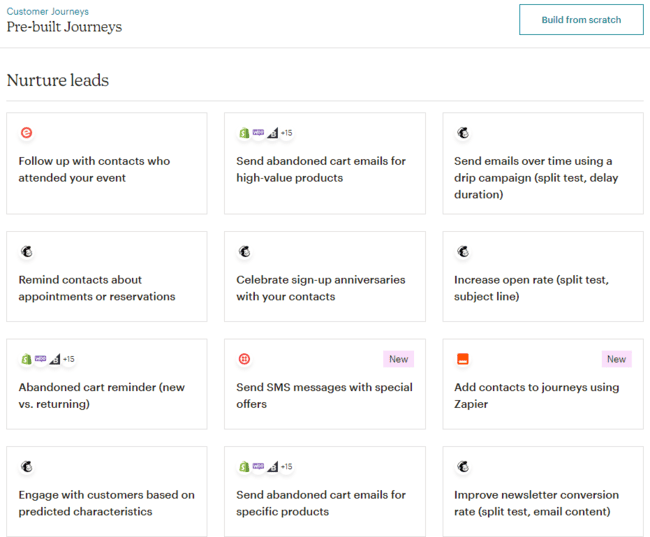
Mailchimp is arguably the most famous email marketing platform. Launched in 2001, it’s also one of the oldest. Many brands start out using Mailchimp as one of their first email platforms, just because it’s very well known.
Does that mean it is a platform that we would advise? Not so much.
It is definitely ok, but it gets very pricey with unfair pricing where you pay double for inactive contacts. And there are many more interesting options available. As much ground as it covers, Mailchimp lost a bit of its email marketing roots and started limiting the free and basic version of its software.
It isn’t nearly as intuitive for building and sending campaigns as other small business email platforms. So rather have a look at MailerLite, Moosend, or Brevo.
Mailchimp Pros
- User-friendly email builder
- 300+ integrations including ecommerce and social media platforms
- Free plan available for basic needs
Mailchimp Cons
- There are contact and email limits on all plans. And costs rise quickly.
- Unfair pricing
Mailchimp paid plans start at $13 per month including 500 contacts and 5000 emails.
Find the best Mailchimp alternatives here or read our full review
12. Campaigner
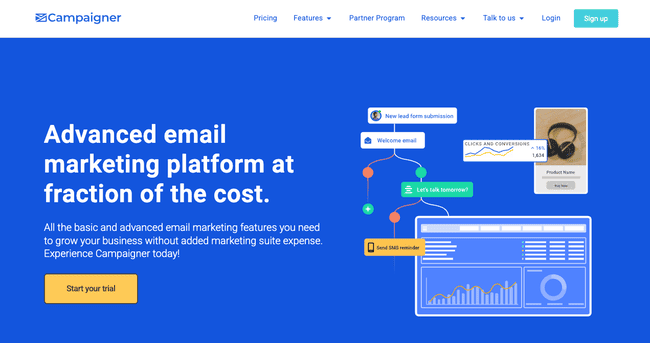
Campaigner is designed for high-volume email marketing. It’s packed full of features that suit larger marketing operations. These include automation, segmentation, and personalization tools. Features include an email API for bulk sending. And reputation management tools to keep your lists clean and avoid being flagged as spam.
Campaigner does a few of the basics well. Its drag-and-drop editor is straightforward to use. Templates are optimized for accurate rendering in different mail clients. A feature I like is its reusable content blocks. These are like mini-templates you can drop into emails. These work well with dynamic content to personalize emails.
Like its email editor, you don’t need to be an expert to use Campaigner’s automation builder. It’s very easy to build sophisticated workflows. You can combine email and SMS in the same sequences.
Campaigner Pros
- Advanced email and SMS automation workflows
- Dynamic content personalization and advanced segmentation
- Reputation Defender for list hygiene
- High deliverability at bulk volumes
- Conversion tracking with ecommerce integrations
Campaigner Cons
- Campaigner is more expensive than many email marketing rivals.
Campaigner paid plans start at $59 per month for 5000 contacts and 30,000 emails. The ecommerce plan starts at $79.95 a month for abandoned cart emails, ecommerce integrations, and unlimited contacts. There is a free 30-day trial that includes all features.
Try Campaigner for free
13. GetResponse
GetResponse has evolved over the years into a complete online marketing platform. Email marketing services are still at its core. But these days it has different tiers for marketing automation and content monetization.
As an email marketing platform, GetResponse is a solid choice for start-ups and small businesses. It’s affordable and very easy to use. Its intuitive drag-and-drop email editor comes with 120+ customizable templates. You can also build unlimited landing pages and sign-up forms. And set up unlimited autoresponders and simple timed sequences.
Growing businesses can unlock more advanced automation tools with the next tier up. This includes conditional workflows and web tracking. These let you automate segmentation for simple but accurate targeting.
GetResponse is also a strong choice if you want to grow your revenue streams. Its funnel builder is aimed at converting new contacts into customers quickly. It’s great for selling subscriptions, tickets, or digital products. Then GetResponse’s top tier is all about building and selling courses.
GetResponse Pros
- Scalable marketing platform for growing businesses
- Simple and affordable email marketing tools
- Advanced automation and segmentation
- Sales funnels for selling subscriptions and digital content
- 24/7 chat and email support
GetResponse Cons
- Some templates look a little outdated
Paid plans start at $19 per month, with unlimited emails and 1,000 contacts. GetResponse has a free plan that includes 2,500 emails and 500 contacts. It includes basic email building and sending tools. But no automation.
Get started with GetResponse for free or read our full review
14. Constant Contact
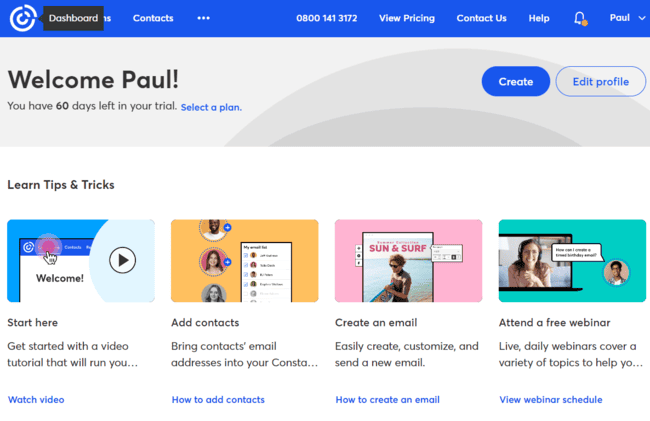
Constant Contact is well-known as one of the first ever email marketing tools. Today it also has automation, lead generation, and event promotion.
Constant Contact tries to smooth the path to creating email campaigns. Its drag-and-drop editor is intuitive but not as straightforward as the editors from MailerLite or Moosend. It has 300+ templates and an AI writing assistant. You can build your list with forms, including popups. Basic automation is available but isn’t a strong point. You can set up pre-scheduled messages, like birthday messages. Or simple triggered sequences like welcome emails.
A strength of Constant Contact is its social marketing tools. You can use it to schedule posts, run social media ads, and track engagement. It’s also very useful for planning and promoting events. You can create event invitations, manage registrations, and track attendance.
Constant Contact Pros
- Easy-to-use drag-and-drop email editor with AI writing
- 300+ responsive email templates
- Integrated social media and event marketing features
- Effective lead generation tools like forms and popups
Constant Contact Cons
- Automation is less advanced than competitors
Constant Contact’s plans start at $12 per month for 500 contacts and 5000 emails. It has a 30-day free trial but no free plan.
Find the best Constant Contact alternatives or read our full review
15. Benchmark Email
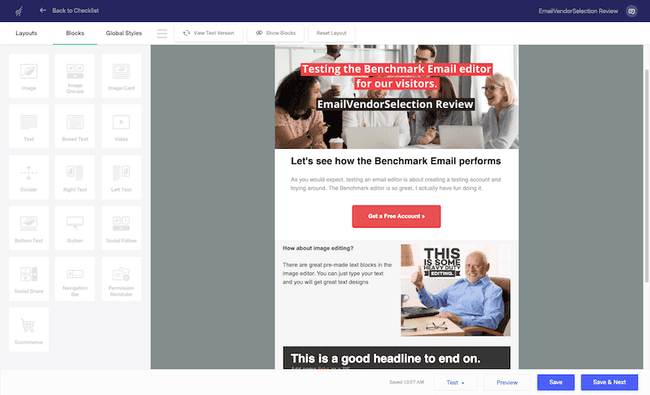
Benchmark Email is a well-established name in email marketing for SMEs. It’s one of the most user-friendly email marketing platforms around. And it represents solid value for money for its customers, too.
Benchmark excels at helping new users get up and running quickly. From sign up, you can be well on your way designing your first email within minutes. Its drag-and-drop editor is well-designed and quick to learn. Pre-made content blocks simplify the design process. And there are 200+ responsive email templates to get started with. Templates come in a wide range of languages.
Sign-up forms and landing pages are similarly easy to build. You can add surveys and polls to forms to encourage more engagement. Automating campaigns is also simple. It doesn’t have the wide choice of triggers some other platforms have. And you can only automate email sending. So no contact segmentation or internal tasks. But you can build some fairly sophisticated workflows with conditions. I like the visual workflow builder, too. It makes good use of symbols and clear descriptions of elements. And there are 11 pre-built workflow templates.
Benchmark Email Pros
- Beginner-friendly tools
- 200+ responsive templates in multiple languages
- Rapid email creation
- User-friendly visual automation builder
Benchmark Email Cons
- Lacks the design flexibility of some rival services.
Benchmark Email plans start at $13 a month for 500 contacts and 7,500 emails. Its free plan includes 500 contacts and 3,500 emails a month.
Try Benchmark Email for free or read our full review
The Best Email Marketing Services for Your Industry
So that’s my take on the 15 best email marketing platforms individually. But what about choosing the right one for your email marketing efforts? Different services suit different types of business.
So what are the best choices for your type of business or sector? Below, I’ve narrowed down the best picks in six different categories.
Best email marketing services for small businesses
Small businesses look for ease of use and low costs in email marketing software. But they should also make sure they get all the features they need.
- MailerLite is hard to beat on both simplicity and value. All of its tools are very user-friendly without being too basic. And it has a very generous free plan.
- Brevo combines email, SMS, and CRM features. It’s ideal for businesses wanting multiple marketing channels in one affordable service.
- Moosend is the cheapest of them all. But it still manages to pack in advanced automation and personalization tools.
Best email marketing services with CRM
Customer relationship management (CRM) tools help businesses with large customer databases use data for better campaign targeting. And they help channel marketing results directly into sales. So you get better engagement, better quality leads, and hopefully more sales.
- ActiveCampaign pairs email marketing and sales CRM features. But its standout feature is marketing and sales automation. It has over 900 customizable workflow templates. And uses contact data for targeting.
- HubSpot is a powerful all-in-one CRM platform. You can integrate email marketing with sales, customer service, and content management. Its adaptable tools support everything from lead nurturing to sales pipelines. And you can mix and match what you need.
- GetResponse is a scalable and budget-friendly alternative. It combines email marketing tools, automation, and funnels. Its straightforward CRM and intuitive funnel builder help small businesses convert subscribers into customers.
Find more tools that combine sales and marketing features in our review of the best CRM tools with email marketing.
Best email marketing platforms for ecommerce
Ecommerce businesses want their email marketing tool to have integration with their ecommerce platform. They’re more likely to be sending out product promotions than newsletters. So they prioritize being able to drop product listings easily into campaigns. Plus, building landing pages for specific campaigns.
- Omnisend stands out with its ecommerce integrations with platforms like Shopify. It uses web store data for segmentation and targeted product recommendations. And it has some great extras like managing customer reviews on Shopify.
- ActiveCampaign’s combined marketing and sales automation tools make it ideal for ecommerce. It connects to all the leading web store platforms. And helps with automating customer journeys, nurturing leads, and integrating sales activities. Its predictive analytics and detailed targeting features are particularly valuable for driving sales.
Best free and cheap email marketing services
Plenty of businesses don’t need the bells and whistles of marketing automation or CRM. They just need a way to build good-looking emails and manage an audience. And you can cover these basics for a small list without having to pay.
- Brevo offers one of the best free plans, allowing 100,000 contacts and 300 emails daily. It also includes SMS, WhatsApp messages, and basic CRM tools.
- MailerLite is incredibly user-friendly and affordable. Its generous free plan covers 1,000 subscribers and 12,000 emails monthly.
- Moosend doesn’t have a free plan. But starting at just $7 a month, it’s one of the cheapest email marketing services around. There are no email send limits. And the quality of its automation and personalization features makes it an exceptional value.
- Mailjet‘s free plan includes 1,000 contacts and 6,000 monthly emails. It’s a great choice if you’d like to send newsletters and set up an email API or SMTP for transactional emails.
Find more tools in our full review of the best free and cheap email marketing tools.
Best email marketing software for newsletters
Newsletters are a staple of email marketing strategy. They are great for building audience engagement. And everyone from solopreneurs to content creators can use them to make money, too.
- Tapping into this trend, beehiiv is ideal for monetizing a newsletter. Its specialized tools include referral programs for one-click subscriptions. And revenue-earning opportunities like ads and affiliate links.
- For more traditional newsletters, MailerLite is perfect for getting started. It has a straightforward email editor, a generous free plan, and reliable deliverability.
- Moosend is great for personalizing who receives newsletters and what they see. And you can automate follow-ups based on how recipients respond.
- Brevo offers versatility with its easy-to-use editor and multi-channel marketing. You can follow up newsletters with conversations via SMS or WhatsApp. And even feed promising leads that come up from them into sales pipelines.
Check out our full review of the best email newsletter platforms for more tools.
Best email marketing platforms for affiliate marketers
Email is a popular channel for affiliate marketers. It’s an easy way to push affiliate links to a large audience. But you have to be careful about which email marketing platforms you choose. Some don’t allow affiliate marketing.
- GetResponse does explicitly support affiliate marketing. And many of its tools are ideally suited to affiliate campaigns. These include send time optimization, advanced segmentation, and contact scoring. Its more advanced automation workflows also help with complex affiliate marketing sequences.
- Moosend is more low-key about its support for affiliate marketing. But its price and automation tools are ideal for side-hustle affiliate marketers.
Check out our review of the best email marketing software for affiliate marketing for more details about affiliate-friendly email tools.
Find the best email marketing service for your business
Choosing the best email marketing tool is ultimately a personal choice. I’ve provided a breakdown of the features, prices, pros and cons of my favourite 15 platforms. And I’ve dipped into how they suit different types of businesses and industries. But now, it’s over to you!
In summary, if I had to pick one all-around email marketing winner, it would be ActiveCampaign. It balances user-friendly design with awesome automation tools. It helps connect the entire customer journey from lead generation to sales. And it still keeps things reasonable price-wise.
For start-ups and SMEs conscious of budget, there are several great value options. MailerLite, Brevo, and Moosend would be my picks. MailerLite is a winner for how simple it is to use. It also has a great free plan. Though the Brevo free plan is even more generous. And includes CRM and multi-channel messaging. And Moosend, the cheapest of all, has some amazing advanced features for the price.
Whatever your business needs, choosing the right email marketing software is about balance. There’s no point selling yourself short on features for a better price. You won’t get good value. You also want to keep one eye on future growth plans. Switching platform a year down the line can get messy.
Happy hunting!